No WLAN port
Wired CarPlay or Android Auto is made for your unit. Connect your phone with a USB cable.
EntryNav2 (EntryEVO) Unit model
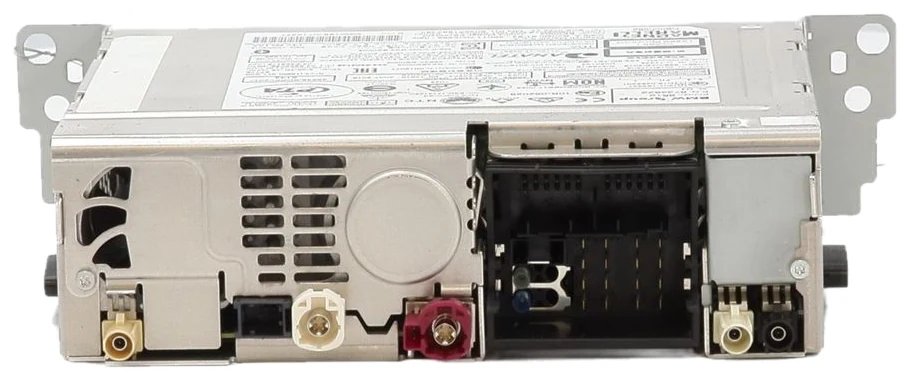 No WiFi plug needed!
Sign in or create an account to access orders, downloads and wallet.
New BMW · EntryNav2 / EntryEvo
Plug in your phone and use it on the original BMW screen. Each order includes one code for one feature: choose CarPlay or Android Auto during installation. No adapter box, no aftermarket screen, just software.
Does your unit have a WLAN port?
Wired CarPlay or Android Auto is made for your unit. Connect your phone with a USB cable.
EntryNav2 (EntryEVO) Unit model
No WiFi plug needed!For CarPlay, you can choose wireless with a Wi-Fi antenna or wired with a USB cable. Android Auto is wired only: wireless Android Auto is not available for EntryNav2.
EntryNav2 (EntryEVO) Unit model
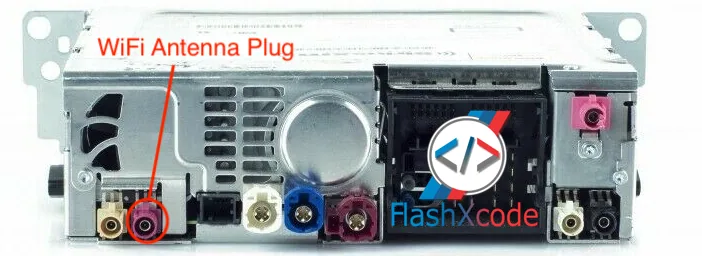
Not sure? Look at the back of your head unit, or send us your VIN and we’ll check it for you.
How it works
Make sure your unit runs one of the supported versions below.
Complete your order and your code arrives automatically.
Run the Infodem Installer and choose CarPlay or Android Auto.
Connect your phone with a USB cable and it appears on the BMW screen.
Features
Nothing added to the cabin.
Control it with the touchscreen or the iDrive controller.
Music and navigation prompts play through the BMW speakers.
Phone calls and voice control work as you expect.
It runs on the original head unit.
You need a Windows laptop and an ENET cable, or we can install it remotely.
Before you order
| Software version | HMI version | I-step (year.month) | Status |
|---|---|---|---|
O2014C1R | 002_146_002 | 20.07 | Supported |
P2021B1R | 002_148_001 | 20.11 | Supported |
Q2051B1R | 002_156_007 | 21.03 | Supported |
R2124C1R | 002_160_003 | 21.11 | Supported |
R2144B1R | 002_162_001 | 21.11 | Supported |
U2324C1R | 002_174_001 | 23.11 | Supported |
T2229C1R | 002_176_001 | 24.07 | Supported |
We recommend the latest version (T2229C1R, 24.07) for the best experience.
Version not listed? Please update your unit to a supported version before installation. If your version isn’t compatible, your code stays valid and you can use it after updating. Orders are not refunded because of an unsupported software version.
One code, one feature. Each code activates either CarPlay or Android Auto. If you want both, place a second order to receive another code.
FAQ
Yes. This product was made for that. It connects with a USB cable, so you don’t need a Wi-Fi antenna.
Yes. Many owners with a WLAN port prefer wireless CarPlay, but the wired product works on these units too.
No. This product works over a USB cable.
Each order includes one code for one feature, and you choose which one during installation. If you want both, place a second order to receive another code.
It’s delivered automatically after your order.
The seven versions listed above, from 20.07 to 24.07. Not sure which version you have? Send us your VIN and we’ll check it.
If your version is listed, you don’t have to, but we recommend the latest version for the best experience. If it isn’t listed, please update before installation.
Your code stays valid. Update your unit to a supported version and use the code then. Orders are not refunded because of an unsupported software version.
NBT EVO has its own product. See Android Auto on NBT EVO.
CarPlay or Android Auto, over a USB cable, on the original BMW screen.