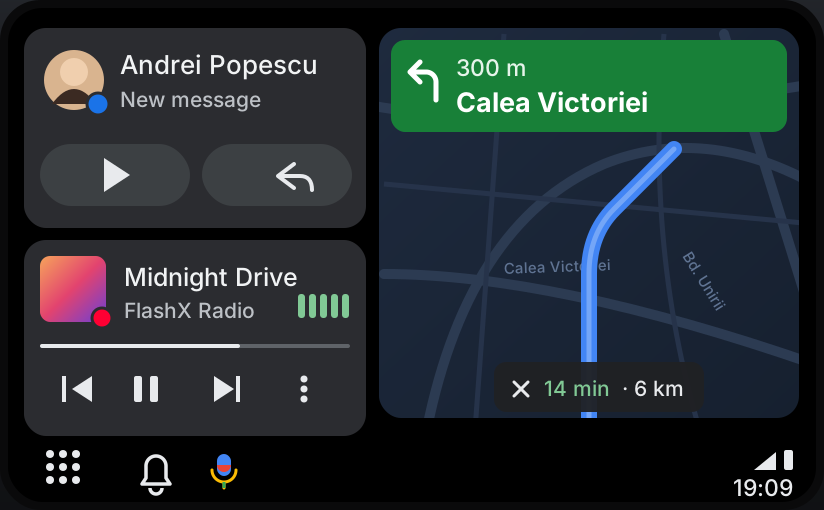
Full-width picture
Fills the wide NBT EVO screen without stretching, and touches land exactly where you press.
Sign in or create an account to access orders, downloads and wallet.
 FlashXCode
Explore our automotive software services for BMW, MINI, Rolls-Royce and Toyota Supra.
Browse the catalogComing soon BMW · NBT EVO
Your Android phone on the NBT EVO screen — full width, controlled by touch or the iDrive knob, with navigation shown on the Head-Up Display and cluster. No adapters, no cables, just software.
How it works
Android Auto starts together with the head unit — nothing to plug in.
Over the car’s Bluetooth and Wi-Fi, automatically, as you sit in the driver’s seat.
Maps on the central screen, music through the BMW speakers, turns on the HUD.
Features
Fills the wide NBT EVO screen without stretching, and touches land exactly where you press.
Control it with the touchscreen, the iDrive controller and the BACK button — like the native menus.
Turns, distance, street names, roundabouts and lanes on the Head-Up Display or LED cluster.
Music through the BMW audio system with the car’s volume controls. Navigation prompts lower the music.
Phone calls and BMW voice control pause Android Auto, then hand back.
Switch between Android Auto and CarPlay without restarting the head unit.
In your iDrive
Android Auto gets its own entry under Multimedia, and the CarPlay button brings it back from any menu.
Running: the phone connected
Try it — tap Open, Connect or Stop.
Requirements
Installed like our CarPlay-on-HUD software: a laptop, an ENET cable and about 15 minutes.
FAQ
It’s in final preparation. Price and release date will be announced soon — tap “Notify me” and we’ll email you first.
No. It runs on the head unit itself and connects wirelessly.
No. CarPlay keeps working, and you can switch between the two without restarting.
Google Maps, Yandex Navigator and 2GIS turn-by-turn prompts are shown on the HUD and cluster.
No. A laptop and an ENET cable are enough — or we install it remotely for you.
Tell us your car and phone — we’ll check compatibility and let you know at launch.