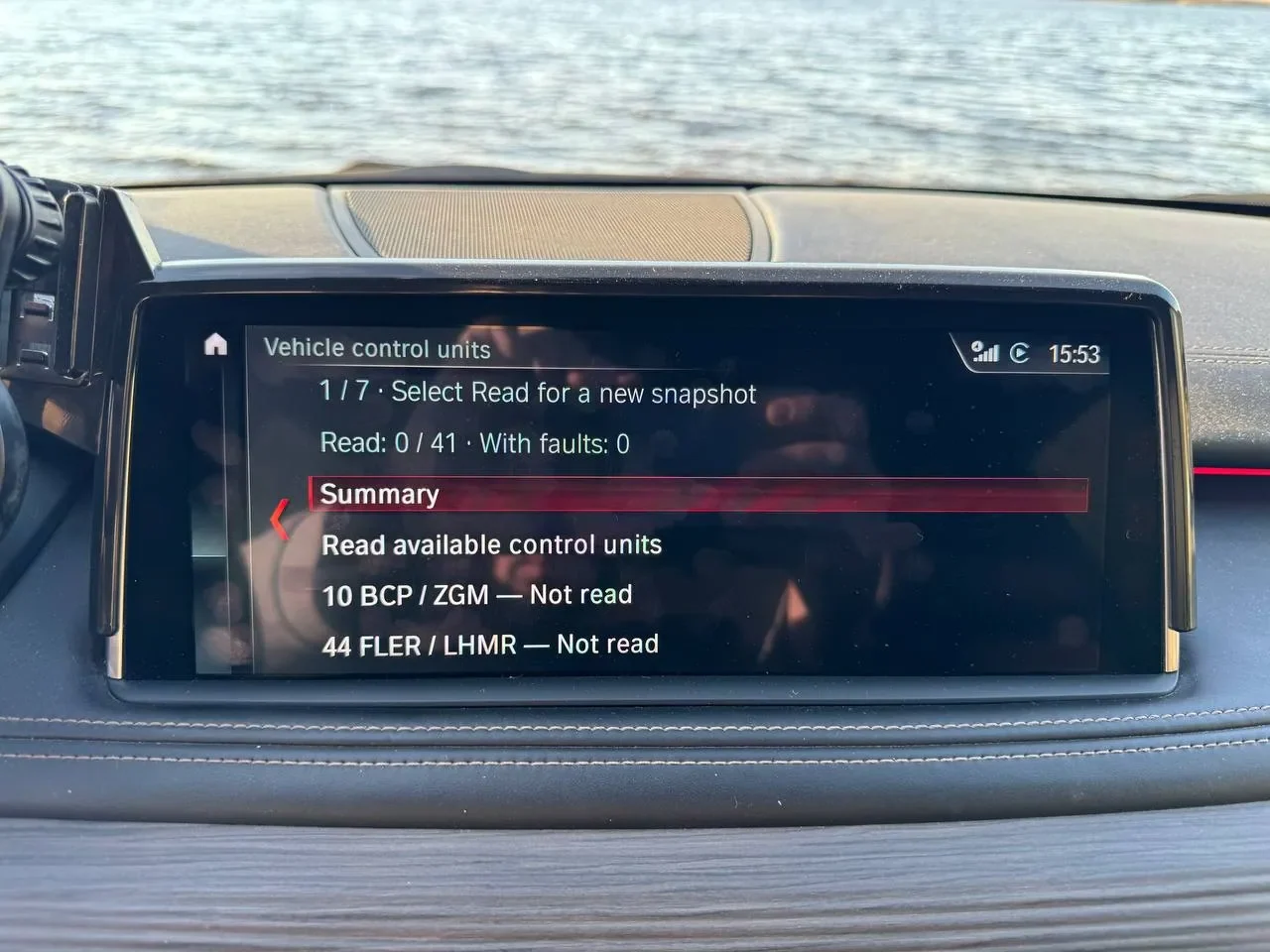
Diagnostics summary on BMW iDrive

CarPlay & Android AutoDigital download

Fault Code Diagnostics on iDrive (NBT EVO)

Price: €65.00

Read fault codes right on your iDrive screen

All responding control units, with fault count per unit
Code, status and plain-language description
No laptop, OBD adapter or phone app needed
Read-only & safe · Software only - about 5 minutes
  • Digital deliveryFiles in My Account after payment
  • VIN-specificPrepared for your car
  • Secure checkoutPayPal, Apple Pay, Google Pay or Wallet
Configure yours

Configure yours.

Fault Code Diagnostics on iDrive (NBT EVO)

CarPlay & Android Auto · Digital download

Price: €65.00
0/17

Overview

At a glance

  • Check your BMW for faults straight from the built-in iDrive menu — no laptop, no OBD dongle, no phone app.

What you see

  • Which control units responded and how many faults each one has
  • Units with no faults clearly separated from units that did not answer
  • For every fault: the code, its status (present now or stored, not currently present) and a plain-language description
  • Descriptions in several languages, stored on the head unit — no internet or phone needed

Safe by design

  • Reading starts only when you choose it, and can be cancelled
  • Nothing runs in the background
  • Read-only: it never clears faults or changes anything in the car. Clearing faults and repairs are left to your workshop.

How it works

  • 1. Open Diagnostics in the iDrive menu
  • 2. Start the read
  • 3. Review the control unit list and open any fault for details

What You need

  • A BMW with an NBT EVO head unit
  • A supported NBT EVO software version
  • The list of readable control units comes with each release; the first version has not been tested on every unit

Head unit software versions

The list grows as versions are tested on cars.

  • NBTevo_H16205L (I-step 16-07) — Not supported
  • NBTevo_H16261I (I-step 16-07) — Not supported
  • NBTevo_E16382A (I-step ID4 2016) — Not supported
  • NBTevo_J16383I (I-step 16-11) — Supported · tested on a car
  • NBTevo_K17052I (I-step 17-03) — Supported

NBTevo_L17193I (I-step 17-07) — Not tested yet

  • NBTevo_E17235A (I-step ID4 2017) — Not supported

NBTevo_M17345I (I-step 17-07) — Not tested yet

  • NBTevo_N18032I (I-step 18-03) — Supported · tested on a car
  • NBTevo_N18092I (I-step 18-03) — Supported · tested on a car
  • NBTevo_O18184I (I-step 18-07) — Supported · tested on a car
  • NBTevo_P18362I (I-step 18-11) — Supported · tested on a car
  • NBTevo_Q18491I (I-step 18-11) — Supported · tested on a car

NBTevo_R19101I (I-step 19-03) — Not tested yet

  • NBTevo_R19144I (I-step 19-03) — Supported · tested on a car
  • NBTevo_S19221I (I-step 19-11) — Supported

NBTevo_S19321I (I-step 19-11) — Not tested yet

  • NBTevo_S19322I (I-step 19-11) — Supported · tested on a car
  • NBTevo_U19384I (I-step 19-11) — Supported
  • NBTevo_V20153I (I-step 20-07) — Supported · tested on a car

NBTevo_V20153J (I-step 20-07) — Not tested yet

  • NBTevo_W20204I (I-step 20-11) — Supported · tested on a car
  • NBTevo_X20511I (I-step 21-03) — Supported · tested on a car
  • NBTevo_Y21272I (I-step 21-11) — Supported · tested on a car
  • NBTevo_Y21432J (I-step 21-11) — Supported
  • NBTevo_Y22292I (I-step 22-11) — Supported · tested on a car
  • NBTevo_Y23236I (I-step 23-11) — Supported · tested on a car
  • NBTevo_Y24073J (I-step 24-03) — Supported · tested

Installation

  • We check your VIN and software version first
  • You receive a personal installation code along with the software and a procedure
  • Same installer as CarPlay → HUD: a Windows laptop and an ENET cable, about 5 minutes
  • Installation from a USB stick is also available

Special prices for resellers - Contact US!

Share this page

Welcome to FlashXCode!We are here to help you!
FlashXCode Owner Dragos Usually replies within minutes

Hi! 👋 I’m Dragos. How can I help? Write your message and I’ll get it on WhatsApp.