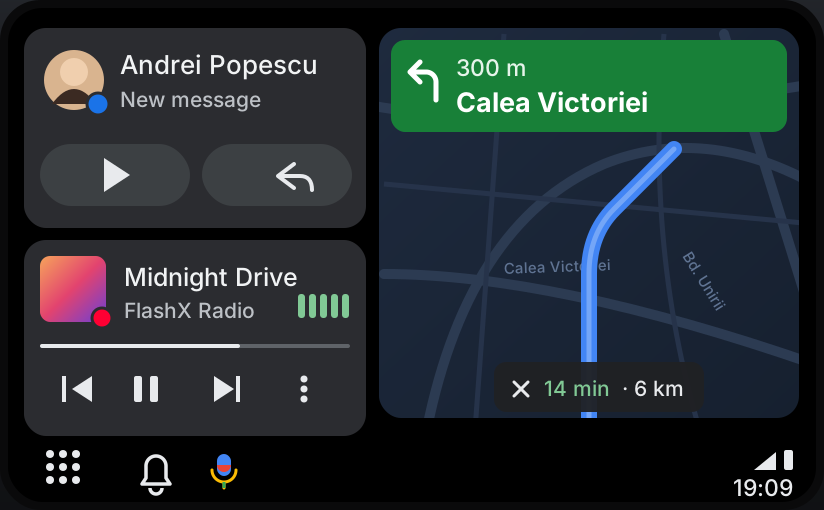
On the original screen
Android Auto right on the EntryNav2 display — nothing added to the cabin.
Sign in or create an account to access orders, downloads and wallet.
Coming soon BMW · EntryNav2
Your Android phone on the original EntryNav2 Unit —controlled by touch or the iDrive knob, with sound through the BMW speakers. No adapter box, no aftermarket screen, just software.
How it works
Android Auto starts together with the head unit, ready when you are.
Connect your Android phone and it appears on the BMW screen.
Maps on the central screen, music and prompts through the BMW speakers.
Features
Android Auto right on the EntryNav2 display — nothing added to the cabin.
Control it with the touchscreen and the iDrive controller, like the native menus.
Music through the BMW audio system with the car’s volume controls. Navigation prompts lower the music.
Phone calls and BMW voice control take priority, then hand back.
Runs on the original head unit. No adapter box, no aftermarket screen.
A Windows laptop and an ENET cable, or we install it remotely for you.
FAQ
Soon. Leave your email with “Notify me at launch” and we’ll tell you the moment ordering opens.
No. It runs on the head unit itself.
The compatibility list is published at launch. Not sure about your car? Send us your VIN and we’ll check.
No. A Windows laptop, an ENET (OBD to Ethernet) cable and a few minutes are enough. Or connect the laptop and cable, and we install it remotely over the internet.
Android Auto for NBT EVO is a separate product — see the NBT EVO page.
Ordering opens at launch — leave your email and we’ll let you know.