
ecu

Repair & UnlockDigital download

BMW Premium ECU Validation Service

From €30.00

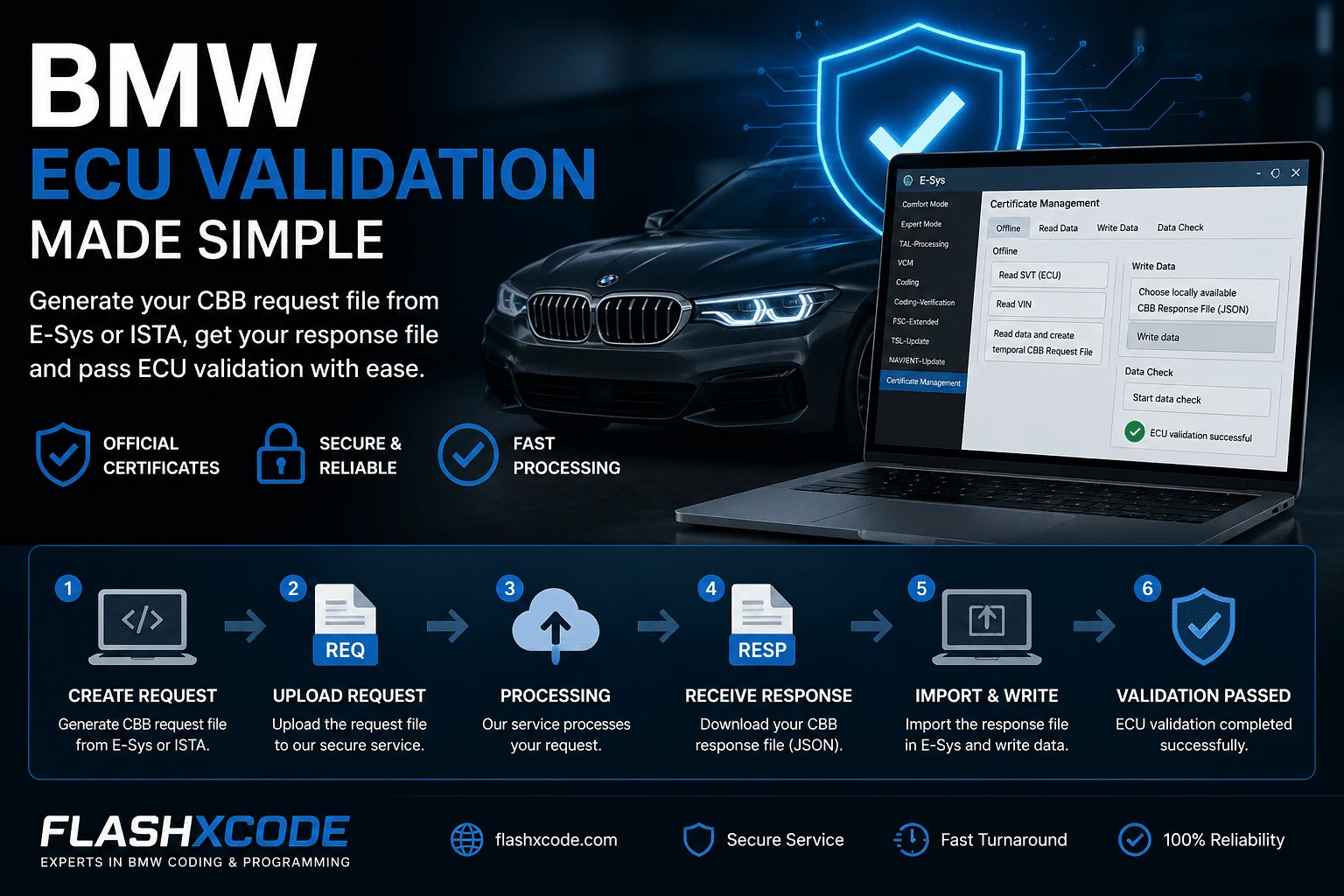
You upload a CBB Request File from E-Sys or ISTA.
After processing, you receive a CBB Response File (JSON), which you import back into E-Sys to successfully pass ECU validation.
Usefull for MGU, ATM2, DKOMBI4 and others
  • Digital deliveryFiles in My Account after payment
  • VIN-specificPrepared for your car
  • Secure checkoutPayPal, Apple Pay, Google Pay or Wallet
Configure yours

Configure yours.

BMW Premium ECU Validation Service

Repair & Unlock · Digital download

From €30.00
0/17

Prices excl. VAT. ≈ €36.30 incl. 21% VAT, final VAT at checkout.

Overview

At a glance

  • ECU Validation via E-Sys (CBB Process)
  • Usefull for MGU, ATM2, Dkombi4 and others
  • Step-by-step procedure
  • Access Certificate Management
  • Open E-Sys
  • Navigate to:

Comfort Mode → Certificate Management

  • Read Vehicle Data
  • Go to the Offline tab
  • Click:
  • Read SVT (ECU)
  • Read VIN
  • Generate CBB Request File
  • Click “Read data and create temporary CBB Request File”
  • Save the generated file locally
  • Process Request File
  • Upload the saved file to the order
  • Wait for processing and download the CBB Response File (JSON)
  • Import Response File into E-Sys
  • Return to E-Sys → Certificate Management
  • Go to the Write Data tab
  • Select:

“Choose locally available CBB Response File (JSON)”

  • Click Write Data
  • Wait until the process completes successfully
  • Validate ECU Status
  • Click “Start Data Check”
  • Confirm that ECU validation is successfully completed

Share this page

Welcome to FlashXCode!We are here to help you!
FlashXCode Owner Dragos Usually replies within minutes

Hi! 👋 I’m Dragos. How can I help? Write your message and I’ll get it on WhatsApp.